
Tips for Creating an Ergonomic Home Office
Working from home offers flexibility and convenience, but it also creates a common challenge: designing a workspace that is comfortable and functional for long periods of work. A dining room table, kitchen counter, or spare chair may work as a temporary solution, but a thoughtfully designed ergonomic home office can make your workday more comfortable and productive. Creating an ergonomic workspace doesn’t necessarily require expensive furniture or a dedicated office suite. It starts with understanding how your desk, chair, monitor, keyboard, lighting, and other equipment work together. Whether you’re setting up a home office for the first time or looking to improve an existing workspace, these tips can help you create a more comfortable and efficient environment.
1. Start With the Right Office Chair
The office chair is one of the most important pieces of ergonomic home office furniture. You’ll likely spend several hours sitting in your chair each day, so choosing a chair based solely on appearance or price can be a mistake. A good ergonomic office chair should allow you to adjust the chair to fit your body rather than forcing your body to adapt to the chair.
Look for features such as:
- Adjustable seat height
- Adjustable seat depth
- Lumbar support
- Adjustable armrests
- A supportive backrest
- A comfortable seat cushion
- A stable five-point base
- Recline and tilt adjustment
Your feet should be able to rest comfortably on the floor while your knees remain approximately level with or slightly below your hips. If your desk is too high for this position, a footrest can help provide additional support. Most importantly, don’t assume the most expensive chair is automatically the best chair for you. Ergonomics is personal, and adjustability is often more important than simply choosing a premium-looking chair.
2. Choose a Desk at the Correct Height
Your desk is just as important as your chair when creating an ergonomic home office setup. A desk that is too high can cause your shoulders to remain elevated and place unnecessary strain on your arms and neck. A desk that is too low can create awkward positioning while you work. For many people, a desk height around 28–30 inches works reasonably well, but the ideal height depends on your body proportions, chair height, and the type of work you perform. That’s why height-adjustable desks have become increasingly popular. A sit-stand desk allows you to change your working position throughout the day rather than remaining seated continuously.
When sitting, aim for a position where your:
- Shoulders can remain relaxed
- Elbows are approximately 90 degrees
- Wrists remain relatively neutral
- Feet are supported
- Keyboard and mouse are easy to reach
The goal is to create a workstation where your equipment fits your body—not the other way around.
3. Position Your Monitor Correctly
Your monitor can have a significant effect on your neck and upper body throughout the workday. A common mistake is positioning a monitor too low, causing you to constantly look downward. For a typical desk setup, the top portion of the screen should generally be around eye level or slightly below. The monitor should also be positioned far enough away that you can comfortably view the entire screen without leaning forward. For most people, roughly an arm’s length is a reasonable starting point, although the ideal distance depends on screen size and vision.
Using multiple monitors?
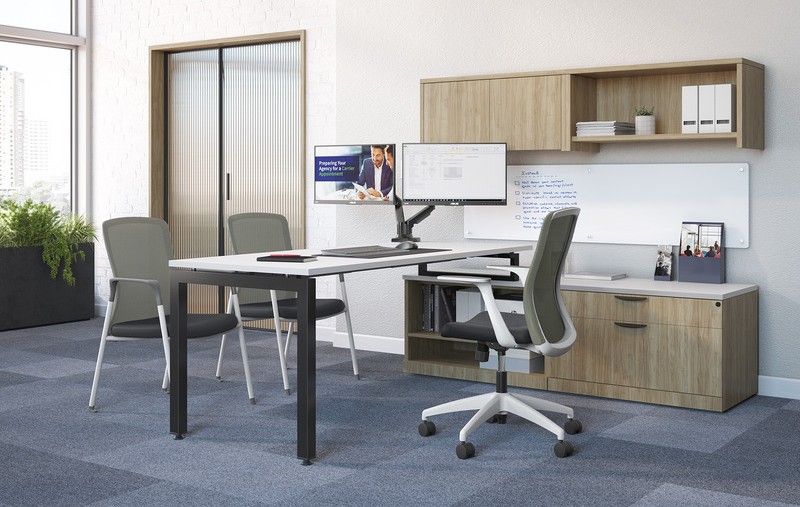
If you use two monitors equally, position them side by side with the center point between the screens approximately aligned with your body. If you primarily use one monitor and occasionally reference a second screen, place the primary monitor directly in front of you and position the secondary monitor off to the side. A monitor arm can make these adjustments much easier while also freeing valuable desk space.
4. Keep Your Keyboard and Mouse Within Easy Reach
Your keyboard and mouse should be positioned so that you don’t have to reach forward or repeatedly extend your arms to use them. Ideally, your elbows should remain relatively close to your body while your forearms extend toward the keyboard. Avoid placing the keyboard at the very back of a deep desk if doing so forces you to reach forward. Your mouse should also remain close enough that you aren’t repeatedly reaching across the desk. For many home office setups, a relatively simple adjustment can make a noticeable difference: bring your keyboard and mouse closer to you and keep frequently used items within easy reach.
5. Consider a Monitor Arm
A monitor arm is one of the simplest upgrades you can make to a home office. Instead of placing your monitor directly on the desk, a monitor arm allows you to adjust its:
- Height
- Distance
- Tilt
- Viewing angle
- Position
It can also free up valuable desk space underneath the monitor. This is particularly useful for smaller home offices where desk space is limited. If you use multiple monitors, adjustable monitor arms can also make it easier to create a setup that works for your specific workflow.
6. Don’t Forget About Lighting
Ergonomics isn’t only about your chair and desk. Lighting can have a significant impact on the overall comfort of your workspace. Whenever possible, position your desk near a source of natural light. However, avoid placing your monitor directly in front of a bright window or with a window directly behind the screen. The goal is to minimize glare and excessive contrast. A desk lamp can provide additional task lighting when natural light isn’t sufficient. Consider using adjustable lighting so you can change the brightness and direction depending on the time of day and the work you’re doing. Your workspace should be bright enough to work comfortably without creating glare on your monitor.
7. Organize Your Desk to Reduce Unnecessary Movement
A cluttered desk can make even a good ergonomic setup feel uncomfortable. Think about the items you use most frequently throughout the day. Your keyboard, mouse, phone, notebook, and other commonly used items should be positioned where you can access them without repeatedly twisting, reaching, or leaning. Less frequently used items can be stored farther away or placed in drawers and cabinets. This is where home office storage becomes more than an organizational feature. Proper storage can help keep your primary work area clear and make your workspace easier to use. A clean desk can also make a home office feel more professional and less distracting.
8. Give Yourself Enough Desk Space
A desk that is too small can create ergonomic problems even if the chair and monitor are properly adjusted. You need enough space for your monitor, keyboard, mouse, and other equipment without forcing everything into a cramped area. Before purchasing a desk, consider everything that needs to live on it.
Do you use:
- One monitor or multiple monitors?
- A laptop?
- A full-size keyboard?
- A printer?
- Speakers?
- Notebooks or paperwork?
- A phone?
- Other equipment?
If you regularly run out of desk space, constantly moving equipment around can become frustrating. A properly sized desk gives you room to position your equipment correctly while keeping the workspace organized.
9. Consider a Sit-Stand Workstation
One of the most popular trends in ergonomic office furniture is the sit-stand workstation. The purpose isn’t necessarily to stand all day. Instead, a height-adjustable desk gives you the ability to alternate between sitting and standing throughout the workday. When standing, your desk should be adjusted so your elbows remain approximately 90 degrees while using the keyboard and mouse. Your monitor should also move with you. This is one reason adjustable monitor arms pair particularly well with height-adjustable desks. The key is flexibility. Rather than being locked into one position for hours, you can change your working position throughout the day.
10. Pay Attention to Your Laptop Setup
Laptops are convenient, but their design creates an ergonomic challenge. The keyboard and screen are permanently connected, which means it’s difficult to position both at an ideal height simultaneously.
If you’re working at a laptop for extended periods, consider using:
- A laptop stand
- An external keyboard
- An external mouse
- A separate monitor
This allows you to raise the laptop screen to a more appropriate viewing height while keeping your keyboard and mouse positioned comfortably. For anyone working from home primarily on a laptop, this can be one of the most worthwhile ergonomic improvements.
11. Don’t Ignore Your Feet
Your feet play a surprisingly important role in a comfortable workstation. When seated, your feet should ideally be supported rather than dangling beneath the desk. If your chair is raised high enough to accommodate the desk but your feet no longer reach the floor comfortably, consider using a footrest. A footrest can provide additional support and help you maintain a more stable seated position. This is particularly useful for shorter users or when working with a desk that isn’t height adjustable.
12. Build Your Workspace Around Movement
Even the best ergonomic office furniture can’t compensate for sitting in exactly the same position all day. A good home office should make it easy to change positions and move throughout the workday. Consider standing for portions of your workday, walking during phone calls, taking short breaks, or simply changing your sitting position periodically. A height-adjustable desk can make changing positions easier, but you don’t need expensive equipment to introduce more movement into your day. The larger principle is simple: Your workstation should support movement rather than locking you into one position.
How to Set Up an Ergonomic Home Office
If you’re starting from scratch, you don’t have to purchase everything at once.
Start with the elements that have the biggest impact on your daily work.
Step 1: Choose a comfortable, adjustable chair
Make sure you can adjust the seat height and maintain good support.
Step 2: Select an appropriately sized desk
Make sure you have enough room for your equipment and can position your keyboard and mouse comfortably.
Step 3: Position your monitor
Raise or lower your monitor so you aren’t constantly looking down.
Step 4: Adjust your keyboard and mouse
Keep them close enough that your shoulders can remain relaxed.
Step 5: Improve your lighting
Reduce glare and make sure your workspace is adequately illuminated.
Step 6: Organize your workspace
Keep frequently used items within easy reach and remove unnecessary clutter.
Step 7: Build movement into your day
Change positions and take regular breaks rather than remaining stationary for hours.
What Is the Best Furniture for an Ergonomic Home Office?
There isn’t one perfect combination of furniture for every home office. The best ergonomic home office furniture depends on your body, the size of your workspace, your job, and how you use your computer.
However, a strong starting point typically includes:
- An adjustable ergonomic office chair
- An appropriately sized desk
- A height-adjustable desk or sit-stand workstation
- A monitor arm or adjustable monitor stand
- An external keyboard and mouse for laptop users
- Appropriate task lighting
- A footrest when necessary
- Storage that keeps the workspace organized
The most important factor is how these pieces work together. A great office chair paired with a poorly positioned monitor won’t create an ergonomic workspace. Likewise, an expensive desk won’t fix an improperly adjusted chair. Ergonomics is about the entire workstation—not one piece of furniture.
Final Thoughts on Creating an Ergonomic Home Office
Creating an ergonomic home office doesn’t have to mean completely redesigning your home. Small changes to your chair, desk height, monitor position, lighting, and workspace organization can significantly improve the way your office functions. If you’re purchasing new furniture, focus on adjustability, comfort, proper sizing, and flexibility rather than simply choosing the furniture that looks best. Your home office should support the way you work every day. At Office Furniture TC, we help businesses and professionals create functional workspaces with new and quality used office furniture, ergonomic solutions, space planning, installation, and reconfiguration services. Whether you’re furnishing a dedicated home office or planning a larger commercial workspace, we’re here to help you find furniture and workspace solutions that fit your needs.
Ready to improve your workspace? Contact Office Furniture TC to discuss your next office furniture project.
Frequently Asked Questions About Ergonomic Home Offices
What makes a home office ergonomic?
An ergonomic home office is designed around the person using it. It typically includes an adjustable chair, appropriately positioned desk, properly positioned monitor, comfortable keyboard and mouse placement, adequate lighting, and enough space to work without unnecessary reaching or twisting.
What is the best desk for an ergonomic home office?
The best desk depends on the individual and their workspace. Height-adjustable desks are popular because they allow users to alternate between sitting and standing and adjust the desk to a more appropriate working height.
How high should my monitor be?
For most people, the top of the monitor should be approximately at eye level or slightly below. The exact position depends on the individual, monitor size, and viewing distance.
Is a standing desk better than a sitting desk?
A standing desk isn’t necessarily better than a sitting desk. The primary benefit of a height-adjustable desk is that it allows you to change positions throughout the day. A combination of sitting and standing can provide more flexibility than remaining in one position.
What is the best chair for a home office?
The best home office chair is one that fits your body and allows you to make appropriate adjustments. Important features can include adjustable seat height, lumbar support, adjustable armrests, seat-depth adjustment, and a supportive backrest.
How can I make my home office more comfortable?
Start by adjusting your chair and monitor, positioning your keyboard and mouse within easy reach, improving lighting, organizing your desk, and making sure you have enough workspace. If necessary, consider upgrading to an ergonomic chair, height-adjustable desk, or monitor arm.
Can I make a laptop workstation ergonomic?
Yes. Because laptop screens and keyboards are connected, it can be difficult to position both correctly. A laptop stand combined with an external keyboard, mouse, and monitor can create a more ergonomic workstation.
Recent Comments